Showing posts with label Aperture. Show all posts

Thursday, April 21, 2011

Create Layered Files In Lightroom


Perfect Layers is the fast and easy way to create layered files in Photoshop Lightroom. With Perfect Layers you can create and edit multi-layered Photoshop files directly within Photoshop Lightroom or use it to combine images from within other applications. Use it to change skies, composite multiple images together and retouch portraits using the built-in blend modes. We're extremely excited about Perfect Layers and hope you'll enjoy trying out the completely free Perfect Layers Public Preview Release.

• Combine multiple images into a layered Photoshop-compatible file

• Adjust layer size, position, blending mode and opacity

• Use the built-in layer masks and masking tools to blend multiple layers together

• Layered files are easily opened in Photoshop if needed

• Super fast launch and file-opening speed

Download FREE beta version here.

Monday, August 16, 2010

Scott Kelby On Aperture Versus Lightroom

In response to a misrepresentation of his views of Aperture versus Lightroom, Scott Kelby wrote a  helpful comparison the two programs. To summarize: far more pros use Lightroom than Aperture; Aperture lacks many of the features found in Lightroom; Aperture is slow and buggy; and Aperture only has one feature that Kelby favors over Lightroom's -- Aperture's making photo books feature.

Here are a few quick excerpts:

...

"I only like Aperture better for one feature -- making photo books. I don’t use it for anything else (I do my slideshows in iPhoto)."

...

"...if I had written an Aperture 4 wish list article, it would have gone on to include features already in Lightroom that Aperture doesn’t do well, or doesn’t do at all, like: automated and manual lens correction and perspective correction, or snapshots and history for your edits, or supporting multiple adjustments with one brush stroke like Lightroom’s Adjustment Brush, or built-in Camera profiles to emulate Nikon/Canon in-camera looks, or a fast responsive crop tool, or crop tool overlays for composition, or setting your default adjustment settings by camera model, camera serial number or image ISO, or expertly-tuned sharpening on output, or saving your print layouts as JPEGs so you can send them to a photo lab, and I could go on and on and on.

"Not to mention that there’s a massive worldwide community built around using Lightroom and supporting Lightroom users, and you can find tons of presets, plug-ins, advice, training books, live seminars, hands-on workshops, and even its own conference available to Lightroom users, that simply doesn’t exist on that scale for Aperture users (and did I mention that Aperture isn’t even available on the Windows platform at all?)."

...

"An independent study by InfoTrends looked at which programs pros are using to process their raw images. Here’s what they found:

"In 2009 (the most current year for which statistics are available) here’s what the pros use:

"Lightroom: 37%

"Aperture: 6.3% (down from 7.5% the previous year, so their pro user base is actually shrinking).

"Now, although Lightroom is available for both PCs and Macs, Aperture is only available on Macs, and you’d think that would help its case quite a bit, but it actually gets worse when you just compare what Mac users are using. Here are InfoTrend’s results when you just look at pro photographers using Macs:

"Lightroom: 44.4%

"Aperture: 12.5% (down from 14.6% the previous year, so their pro user base is actually shrinking on the Mac, too)."

...

You can read Kelby's complete article here.

Wednesday, February 17, 2010

Aperture 3.0 Versus Lightroom 2.0 / 3.0


Now that Apple has come out with a 3.0 version of Aperture, the competition between Adobe Lightroom and Aperture is heating up. From my perspective, there really hasn't been any competition until now.  I bought Aperture the moment it was announced, weeks before it was released, before I had heard anything about Lightroom. My early experience with Aperture was horrendous, as were many other users. The program was slow, buggy, and poorly supported. There was, in fact, a mini rebellion among many first adopters about all kinds of issues, including how much the program cost. When Lightroom came out -- and came out as a FREE (did I say FREE) demo -- many frustrated Aperture users, me included, took it for a test spin, migrated, and never looked back.

Until now.

While I haven't taken Aperture 3.0 for a spin yet, I plan to. In fact, while I haven't touched Aperture since version 1.0, I plan to upgrade to 3.0. That's because I want to use Aperture's wedding album / book making functions, which is sadly lacking in Lightroom. And while I'm at it, I also plan to try out some of the new features that people like Chase Jarvis and Joe McNally have been raving about. In advance of purchasing the $99.00 upgrade, I've spent some time watching the tutorials Apple has posted, which are great!

So what, exactly, are the pros and cons? How do these two titans compare to one another? Here's where you can find a few great reviews and feature-by-feature comparisons. The first piece, by Matt Kloskowski, is the best because it includes many real-world comparisons from people who have actually used both programs.

5 Reasons To Stay With Lightroom (And Not Switch To Aperture)
By Matt Kloskowski

Five Reasons For Switching From Lightroom 2 To Aperture 3
By Marco Davi

First Impressions Of Aperture 3
By Thomas Fitzgerald

Apple Aperture 3.0 Awesomeness
By Chase Jarvis

Aperture 3 Was My Idea
By Joe McNally

Apple's Aperture 3 Causing Significant Memory Leak For Many Users
By Seth Weintraub

Thursday, March 26, 2009

Viva Viveza!


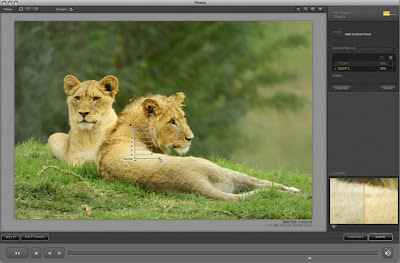
I first heard about Nik Software's U-Point technology when they worked with Nikon to develop Capture NX. I was so impressed with what this technology could do, that I bought Capture NX when it first came out -- and then, because of a clunky interface and buggy program, abandoned it. My interest was recently reawakened when Scott Kelby and Matt Kloskowski began showcasing Nikon's Capture NX 2 software on their new D-Town program. I upgraded, but was again unhappy with the clunky interface and also didn't relish the idea of using (and learning) another software program to edit images in. Wasn't there a way to incorporate U-Point technology into Photoshop or Lightroom, which are the two main editing programs I use?

Turns out there is! The Nik software folks have come out with a program called "Viveza" which provides a U-Point plugin for Photoshop, Lightroom, and Aperture. Although pricey ($249.00), I think it is worth it. I bought the software and now have it working in both Lightroom and Photoshop -- and love what it can do!

Here's how Nik Software describes Viveza:

"Two of the most important factors in creating great photography are color and light. Mastering the art of selectively correcting or enhancing each of these is now possible for every photographer without the need for complicated masks or selections, or expert-level knowledge of Photoshop. Integrating award-winning U Point technology, Viveza is the most powerful and precise tool available to control light and color in photographic images.

"U Point powered Color Control Points, placed directly on colors or objects in an image (such as sky, skin, grass, etc.), reveal easy-to-use controls that photographers can use to quickly adjust brightness, contrast or color in a fraction of the time needed by other tools. With Viveza you’ll spend more time shooting photographs and save hours of image editing."


Here's where you can read more about it, watch tutorials, and download a 15-day fully functioning demo.

And, finally, here's a coupon code that will shave some buckeroos off that hefty $249.00 price tag: NIKPSS.

Thursday, April 24, 2008

Scott Kelby's Top Five List For Everything


Excerpts:

Five Cameras I’ve Been Really Impressed With:

1. The Nikon D3 (I think it’s the best DSLR ever made)

2. The Canon EOS 1D Mark III (If it weren’t for the D3, I’d be shooting this)

3. The Nikon D300 (Ridiculous bang for the buck)

4. The Canon 40D (A pro-quality camera at a great price)

5. The Canon G9 Point & Shoot (Probably the best point and shoot ever).


............

Five other software apps I use:

1. Apple’s iPhoto (for photo slideshows)

2. Apple’s Aperture (for making photo books)

3. Keynote (for slide presentations)

4. Toast (for burning CDs and DVDs)

5. Nikon Camera Control Pro 2 (for shooting tethered into my Mac)


Complete list.

Tuesday, February 12, 2008

Mac OS X 10.5.2 Update

Mac OS X 10.5.2, released today as a free update to the current version of the Mac operating system, adds support for RAW files from the Canon EOS-1Ds Mark III, Canon PowerShot G9, Hasselblad CF-22, Hasselblad CF-39, Leaf Aptus 75s, Nikon D3, Nikon D300 and Sony Alpha DSLR A700. Apple's Aperture support forums, Joe Schorr, Sr. Product Line Manager for Photo Applications at Apple, hinted (for the second time) that this update was imminent, and that new features are coming to Aperture as well.

Click here for more information.