Showing posts with label tutorials. Show all posts

Thursday, November 24, 2011

PictureCorrect: Top 10 Most Popular Photography Articles of 2011


The following 10 articles were the most popular articles on PictureCorrect for 2011. Go here to read all about them.

1. How to Use Depth of Field

2. Top 10 Photographers Every Student Should Study

3. How to Take Photos in Low Light

4. Low Light Photography Tips

5. Steps to Macro Photography and Tips

6. How to do HDR Photography

7. Time-lapse Photography

8. Aperture and Shutter: Science of the F-stop

9. Street Photography Tips and Techniques

10. Swedish Nature Photographer of the Year Exposed as Fraud


Saturday, August 20, 2011

The Candid Frame Interviews Scott Kelby


Scott Kelby is a photographer, writer and educator. He is the founder of the National Association of Photoshop Professionals and the Kelby Media Group. He has authored over 50 books on photography and photo editing and created the event which is Photoshop World. His books, video, podcasts and workshops have helped nurture the work and career of thousands of photographers from all over the world. He has a abiding passion for sports photography as well as playing a mean guitar. You can discover more about Scott and his own photography work by visiting his blog and you can find out about the many things his organization has to offer by visiting the NAPP website


Monday, July 25, 2011

Trey Ratcliff On Creating HDR Images


................


................

Go here to find out more about Trey, Photomatix Pro (the software he demos in this video), and a bunch of other software he recommends when shooting/processing HDR images.

Tuesday, May 3, 2011

Low Light Photography Tips - Infographic

An infographic for shooting in low light situations. Click the graphic to view full-sized image.


Source: SnapBlog

Tuesday, June 8, 2010

Lightroom 3 Learning Center


Scott Kelby and Matt Kloskwoski provide a nice introduction to some of the cool features found in Lightroom 3. Here's where to go to watch a series of videos that illustrate their favorite Lightroom 3 features.

Friday, January 15, 2010

Kelby TV


Your one-stop source to learn everything about Photoshop, Lightroom, Nikon, and photography in general, including an endless stream of easy to understand tips from pros who know what they are talking about. Go here to pick from hundreds of fast-paced, informative, user-friendly programs.

New Season Of D-Town TV


Scott has a tip on using neutral density filters to shoot with fast lenses during the day. Matt heads to Ybor City to share multiple new tips on shooting HDR. Joe McNally drops by with a tip on getting usable light from an on-camera flash.Plus tips on shooting sports and landscapes.

Thursday, January 7, 2010

The Digital Photography Book, Volume 3

Product Description:

"Scott Kelby, author of The Digital Photography Book, volume 1 (the world’s best-selling digital photography book of all time), is back with a follow-up to his volume 2 smash best seller, with an entirely new book that picks up right where he left off. It’s even more of that 'Ah ha -- so that’s how they do it,' straight-to-the-point, skip-the-techno-jargon stuff you can really use today to make your shots even better.

"This book truly has a brilliant premise, and here’s how Scott describes it: 'If you and I were out on a shoot and you asked me, ‘Hey Scott, I want the light for this portrait to look really soft and flattering. How far back should I put this softbox?’ I wouldn’t give you a lecture about lighting ratios, or flash modifiers. In real life, I’d just turn to you and say, ‘Move it in as close to your subject as you possibly can, without it actually showing up in the shot.’ Well, that’s what this book is all about: you and I out shooting where I answer questions, give you advice, and share the secrets I’ve learned, just like I would with a friend -- without all the technical explanations and techie photo speak.'

"Each page covers a single concept on how to make your photography better. Every time you turn the page, you’ll learn another pro setting, tool, or trick to transform your work from snapshots into gallery prints. If you’re tired of taking shots that look 'okay,' and if you’re tired of looking in photography magazines and thinking, 'Why don’t my shots look like that?' then this is the book for you.

"This isn’t a book of theory -- full of confusing jargon and detailed concepts. This is a book on which button to push, which setting to use, and when to use it. With nearly 200 more of the most closely guarded photographic 'tricks of the trade,' this book gets you shooting dramatically better-looking, sharper, more colorful, more professional-looking photos every time."


The Digital Photography Book, Volume 3

The Digital Photography Book, Volume 2

Saturday, December 26, 2009

Lightroom 3 Learning Center

Most of you have probably heard that Adobe has released a beta version of Lightroom 3. They have also made this beta available to the general public, for free, until April 30, 2010, which is when the beta expires. There are a bunch of mouth-watering features, including new algorithms that allow for more accurate and sophisticated editing of images. You can download the new beta here. For some great video tutorials, check out NAPP's Lightroom 3 Learning Center and Adobe's own video tutorials.

Saturday, April 11, 2009

DTownTV: Outstanding Series for Nikon Shooters


I've reported on this before, but this show is so good, I wanted to remind all of you again. If you are a Nikon shooter, this program, featuring Scott Kelby and Matt Kloskowski, is outstanding. Every episode includes Nikon tips, tricks, and information that will dramatically improve, sharpen, and expand your abilities as a Nikon photographer. http://www.dtowntv.com/

Thursday, March 26, 2009

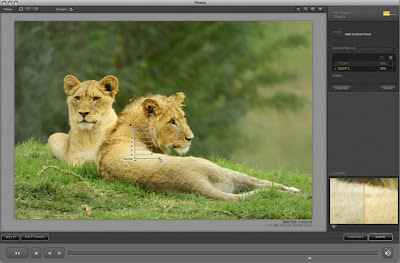
Viva Viveza!


I first heard about Nik Software's U-Point technology when they worked with Nikon to develop Capture NX. I was so impressed with what this technology could do, that I bought Capture NX when it first came out -- and then, because of a clunky interface and buggy program, abandoned it. My interest was recently reawakened when Scott Kelby and Matt Kloskowski began showcasing Nikon's Capture NX 2 software on their new D-Town program. I upgraded, but was again unhappy with the clunky interface and also didn't relish the idea of using (and learning) another software program to edit images in. Wasn't there a way to incorporate U-Point technology into Photoshop or Lightroom, which are the two main editing programs I use?

Turns out there is! The Nik software folks have come out with a program called "Viveza" which provides a U-Point plugin for Photoshop, Lightroom, and Aperture. Although pricey ($249.00), I think it is worth it. I bought the software and now have it working in both Lightroom and Photoshop -- and love what it can do!

Here's how Nik Software describes Viveza:

"Two of the most important factors in creating great photography are color and light. Mastering the art of selectively correcting or enhancing each of these is now possible for every photographer without the need for complicated masks or selections, or expert-level knowledge of Photoshop. Integrating award-winning U Point technology, Viveza is the most powerful and precise tool available to control light and color in photographic images.

"U Point powered Color Control Points, placed directly on colors or objects in an image (such as sky, skin, grass, etc.), reveal easy-to-use controls that photographers can use to quickly adjust brightness, contrast or color in a fraction of the time needed by other tools. With Viveza you’ll spend more time shooting photographs and save hours of image editing."


Here's where you can read more about it, watch tutorials, and download a 15-day fully functioning demo.

And, finally, here's a coupon code that will shave some buckeroos off that hefty $249.00 price tag: NIKPSS.

Friday, February 27, 2009

Nikon D-Town

DTownTV is a weekly show brought to you by Scott Kelby and Matt Kloskowski with KelbyTraining.com. Join Scott and Matt each week as they share their photography knowledge along with the coolest tips and tricks out there for Nikon’s digital SLR cameras.

Nikon D-Town Website
Nikon D-Town RSS Feed

Wednesday, January 7, 2009

Specky Boy Resources


Gobs of great resources, including Photoshop tutorials, browser plugins, graphic design helpers, logo generators, web design tools, fonts, background generators, and more. SpeckyBoy.

Top 30 Photoshop Text Effects Tutorials of 2008

Top 30 Photoshop Text Effects Tutorials of 2008. Go here to see more examples and read the tutorials that tell you, step-by-step, how to create each of these effects.